

Paid plugin for WooCommerce stores
Know within minutes when your checkout breaks
Store Guardian places a real test order on your store every hour and right after every update. If checkout fails, you get an alert naming the update that caused it, and one click puts the working version back.
One-click setup · Block and classic checkout · Test orders leave no trace · Test and staging sites free
A broken checkout makes no noise
The site still loads, uptime monitors stay green, and nobody complains. Customers simply leave, and you find out days later from a sales report that looks strangely quiet.
Updates break things
A typical store runs 20 to 40 plugins, several of them updating every week, often automatically at night. One bad update is enough to stop orders.
Nothing warns you
Uptime monitors only check that your home page loads. A payment button that does nothing or an error after “Place order” only shows up in a real purchase.
Fixing it costs hours
Which of last night’s updates did it? And restoring a hosting backup puts everything back, including the orders you took since.
How it works
1
Press Start
Store Guardian picks a test product, detects whether you use the block or classic checkout, and uses your store address. There is nothing to configure.
2
It buys like a shopper
Every hour, and a minute after every update, it adds a product to the cart, enters an address, pays with a hidden test method and checks the order. Then it removes the order and puts the stock back.
3
You hear about it first
An alert by email, Slack or Telegram names the step that failed, the PHP error, and the update that came just before. One click restores the version that worked.
See it in action
A real test on a WooCommerce store: an update to a shipping plugin breaks checkout. Here is what the store owner sees.
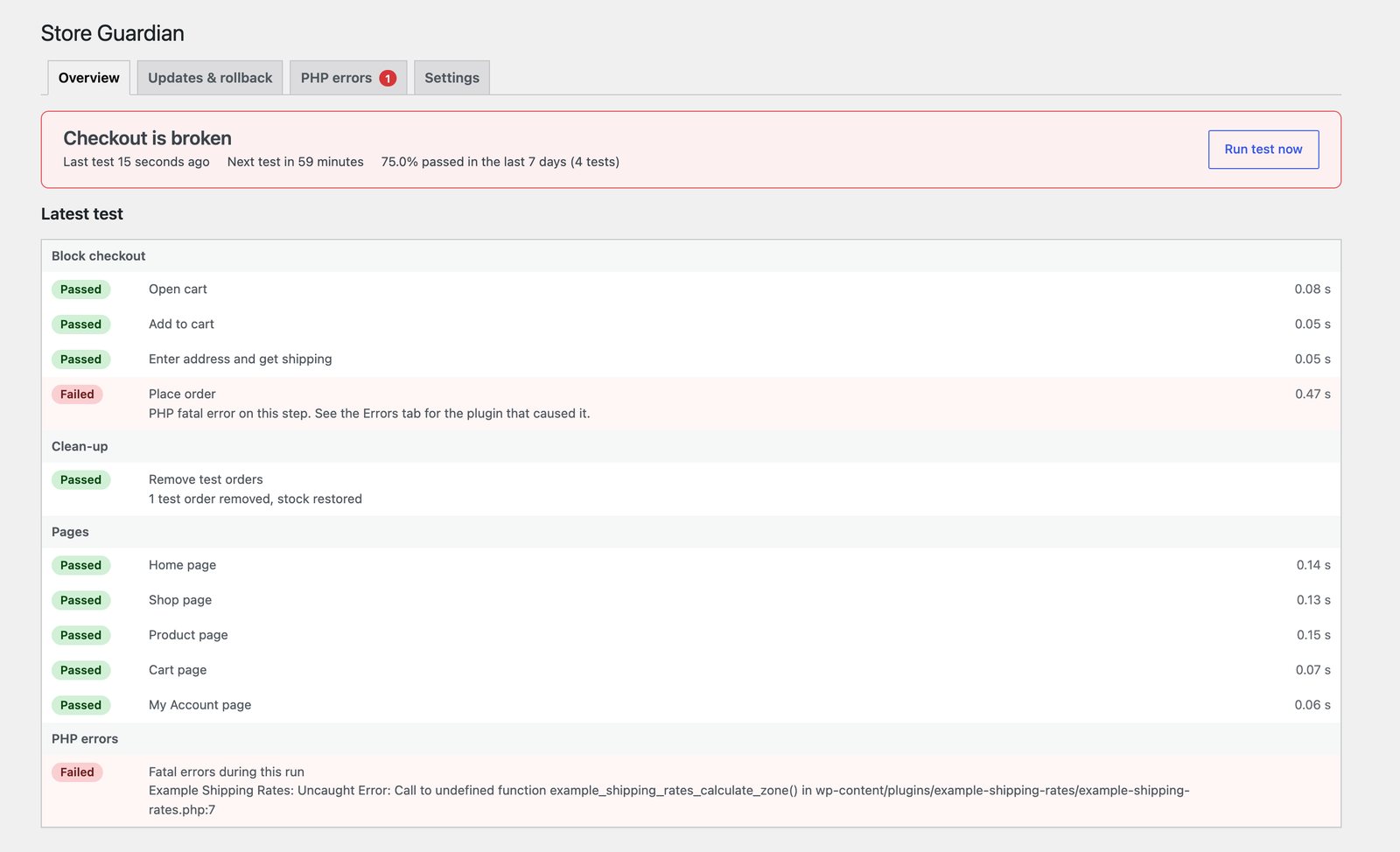
1. Caught within a minute. The update to Example Shipping Rates 2.4.1 broke "Place order". Store Guardian names the step, the plugin and the exact error.
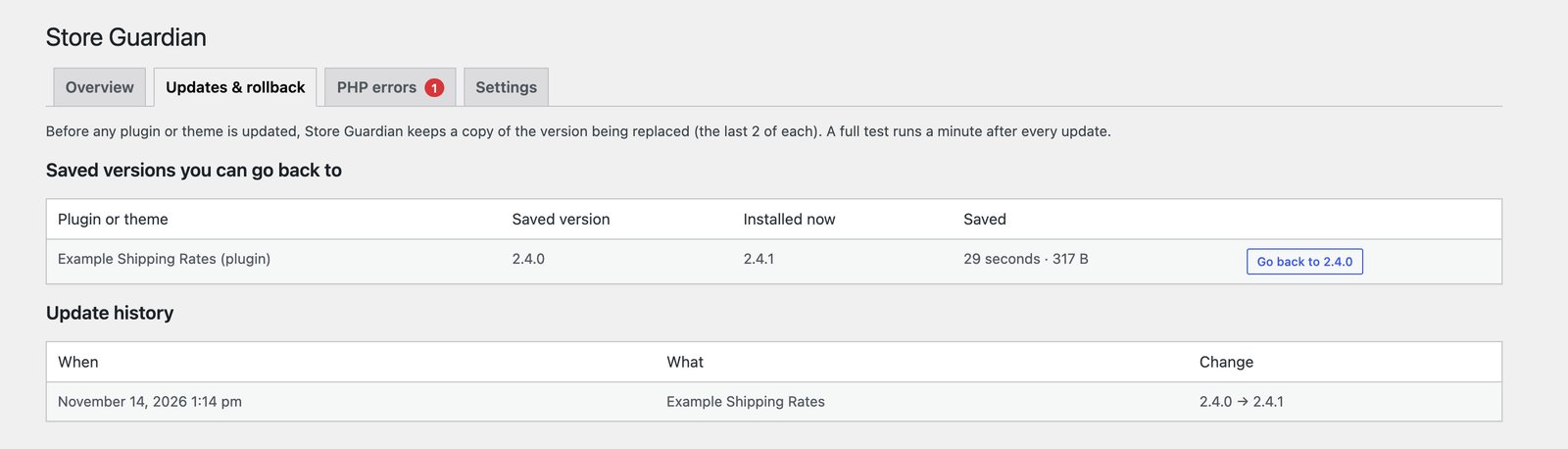
2. One click to undo. The working version was saved before the update. "Go back to 2.4.0" puts it back.
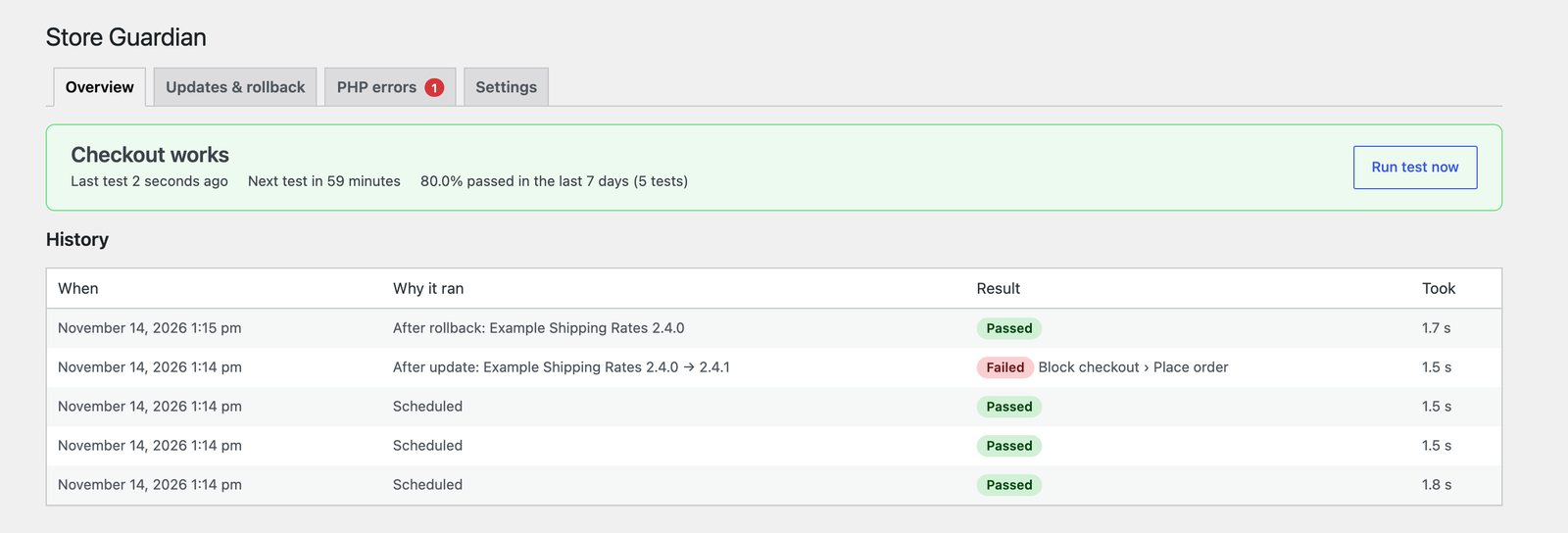
3. Checkout works again. A new test confirms it, and the history shows exactly what happened.
Every feature, in every plan
Real test orders
Block checkout and classic checkout, an optional coupon, and the extra required fields other plugins add (delivery date, VAT number) filled in automatically.
Leaves no trace
Test orders send no emails and trigger no webhooks. Stock, sales counts and coupon usage are put back, and the order is deleted, so it never shows in Orders or Analytics.
Outside watch
A store that is down cannot warn you itself. If your store stops reporting test results, hdwebmobile.com emails you, and again when it is back.
Safe updates
Before any plugin or theme updates, the version being replaced is saved. Go back in one click, or let Store Guardian undo a breaking update by itself.
Alerts that don’t spam
One alert when checkout breaks and one when it works again, by email, Slack, Discord, Google Chat, webhook or Telegram. Plus a short report every Monday.
All your stores on one screen
Your account lists every store on your licence with its latest result and when it last tested. Made for agencies looking after many stores.
PHP errors, by plugin
Every fatal PHP error on any page, in the admin or in background jobs, with the plugin or theme it came from and how often it happened.
Errors real shoppers hit
Test orders prove checkout works. This shows what real customers ran into: card declines, checkout errors and broken scripts, with an alert when one keeps coming back. No personal data is kept.
Page checks
Home, shop, product, cart and account pages must load without errors, and any step slower than 8 seconds is flagged.
English and German
The whole plugin is available in English and German, including the alerts and the weekly report.
How Store Guardian compares
| Uptime monitor | Hosting backup | Typical checkout monitor | Store Guardian | |
|---|---|---|---|---|
| Runs a real purchase | No | No | Some, every 2 hours or less often | Yes, every hour and after every update |
| Notices a broken checkout | Only if the whole site is down | No | Yes | Yes |
| Names the update that caused it | No | No | At best a guess | Yes |
| Undoes the breaking update by itself | No | No | No | Yes, then tests again |
| Fixes it without losing today’s orders | No | No: restores the whole site | No | Yes: restores only that plugin |
| Shows errors real shoppers hit | No | No | Some | Yes, with alerts |
| Warns you if the whole store goes down | Yes | No | No | Yes, from outside your server |
| Alerts by | Email or app | — | Email, Slack, Discord, Google Chat, Telegram, webhook | |
| All your stores on one screen | Some | No | Some | Yes |
Simple yearly pricing
Every plan has every feature. Test and staging sites are always free.
Launch sale: 30% off your first year. No code needed, the price is already reduced. Ends 15 December 2026.
Single site
€79 €55 / year
For one store.
- 1 live site
- Every feature
- 12 months of updates and support
Most popular
5 sites
€149 €104 / year
For store owners with a few shops.
- 5 live sites
- Every feature
- 12 months of updates and support
Agency
€299 €209 / year
For agencies looking after client stores.
- 25 live sites
- Every feature
- 12 months of updates and support
Prices in euros, billed once a year. If you don’t renew, Store Guardian keeps working; only updates and support stop. Payments go through a secure checkout, and card details are handled by the payment provider, never stored on this site.
Questions
Do test orders show up in my orders, reports or emails?
No. While a test order is placed and removed, no email of any kind is sent and store webhooks don’t fire. Each order is cancelled, so WooCommerce itself puts back stock, sales counts and coupon usage, and then deleted, so it never appears in Orders or Analytics.
Can a customer see or use the test payment method?
No. It only exists inside Store Guardian’s own test requests, which carry a one-time code signed with your site’s private key and valid for five minutes. Shoppers and your Payments settings never see it, and your real payment gateway is never charged.
Will it slow my store down?
No. A full test takes a few seconds of server time once an hour and runs in the background, so shoppers never wait for it.
What happens if I don’t renew?
Store Guardian keeps working with every feature. You only stop getting new versions and support. You can renew any time from your account; renewing early adds a year from your current end date, so you lose nothing.
Can I move my licence to another site?
Yes. Deactivate it in the plugin’s settings, or free up the site from My Account on this site, then activate it on the new one. Local, staging and test sites never count towards your limit.
Does it test my real payment gateway?
It tests everything up to and after payment: cart, address, shipping, coupons, placing the order, and everything that runs when an order is paid. The payment itself uses a hidden test method, so no money moves and your gateway account is never touched.
Stop finding out from a quiet sales report
Set it up in one click and let it check your checkout every hour.